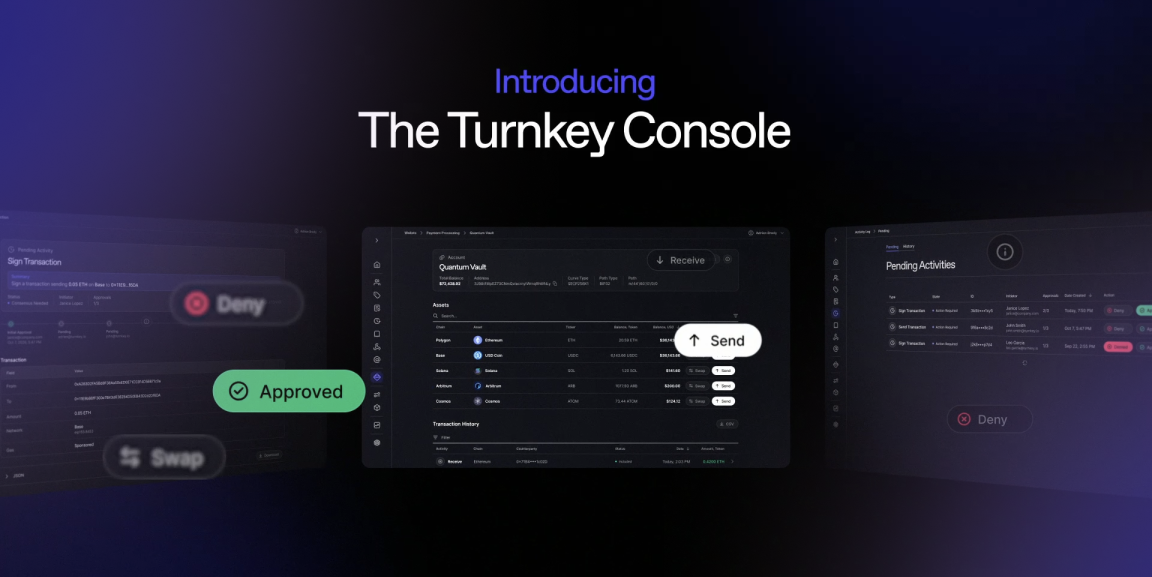
Turnkey is upgrading its dashboard with new capabilities and a more streamlined experience for managing onchain funds. Turnkey is calling the upgraded dashboard the Turnkey Console, one place to create wallets, send and receive funds, swap assets, check balances, set policies, and track transactions across your Company Wallets.
Until now, managing an onchain treasury on Turnkey required building internal tools for non-technical operators. Sending and swapping funds on Turnkey required API calls, while receiving funds meant retrieving wallet addresses from the Turnkey Dashboard.
The Turnkey Console removes that complexity by bringing Treasury Management, Asset Operations, and Security Controls into one interface. Operations, finance, and treasury teams can now manage funds directly in the Turnkey Console, without writing code or compromising Turnkey’s security standards.
What is the Turnkey Console?
The Turnkey Dashboard has been the central hub for managing your Turnkey org. Now, the Turnkey Dashboard is also where teams operate onchain funds day to day. Wallets, policies, root quorum settings, activity logs, balances, and transaction history now sit in one place.
The Turnkey Console brings three areas of work into one interface:
- Treasury Management: send, receive, check balances, and view transaction history.
- Asset Operations: Convert treasury assets into stablecoins or other tokens across networks, with the ability to earn yield on holdings coming soon.
- Security Controls: Create wallets, set policies, and approve transactions that require additional authorization.
Treasury Management: Send, receive, and track funds
Treasury Management covers the three jobs operators handle most often.
- Send validates the recipient address client-side, offers an optional gas-sponsorship toggle, and shows live status as a transaction moves from broadcast to inclusion or failure. When a transaction requires approval, the Turnkey Dashboard surfaces the pending state clearly and updates the moment the approval lands.
- Receive opens a modal with the full address, a QR code, an address-type label, and a warning against sending on the wrong network. You no longer need to copy an address out of a settings page and hope for the best.
- Transaction History sits on the account detail page in the Turnkey Dashboard, next to balances and assets. Transaction History includes per-asset status indicators, a detailed modal for each transaction, and pagination for high-volume accounts, so finance teams can reconcile without opening a block explorer.
Together, the Send, Receive and Transaction History flows let operations and finance teams move, receive, and reconcile funds in the Turnkey Console.
Asset Operations: Swap treasury assets across chains
Operators can swap treasury assets directly from the Turnkey Console, converting holdings into stablecoins or other tokens on the same chain or across networks. Swapping in the Turnkey Console makes it easier to rebalance treasury holdings, consolidate funds into stablecoins, or move liquidity between networks without using an external exchange.
Turnkey Console swaps route through independent DEX aggregators to access competitive pricing. Turnkey handles transaction construction, token approvals, and execution, while every swap remains subject to the same policies that govern the organization's onchain activity.
Earn is planned as the next addition to Asset Operations. Earn will let operators put idle treasury funds to work in onchain lending vaults. With Earn, teams will be able to deposit assets, track yield-generating positions, and withdraw funds directly from the Turnkey Console, without managing separate DeFi integrations.
Security Controls: Manage wallets, policies, and approvals
Operators can create new wallets, name accounts, approve pending transactions, and set granular policies directly from the Turnkey Dashboard.
The Turnkey Dashboard security controls let teams manage who can access wallets, what transactions they can execute, and when additional approvals are required, all through point-and-click flows rather than code.
Enclave-backed security for every transaction
A new interface does not mean a new trust model. Every transaction initiated from the Turnkey Dashboard is signed inside a secure enclave and authorized by the same rules as an API request: the policy engine for non-root users and the root quorum threshold for root users.
Turnkey runs transaction signing and authorization inside AWS Nitro Enclaves, so private keys are never exposed to Turnkey, your application, or your team.
Built for operators
The Turnkey Console gives operations, finance, and treasury teams direct control over their Company Wallets, without relying on developers for day-to-day tasks. Non-technical team members can send and receive funds, swap assets, monitor transactions, and manage wallet permissions through the Turnkey Console. No scripts to write or internal tools to build.
Every Turnkey Console action remains protected by the Turnkey infrastructure that powers more than $200 billion in stablecoin volume: enclave-backed signing, a programmable policy engine, and quorum-based approvals.
Get started with the Turnkey Console
The new Turnkey Console features are available to all customers within the Turnkey Dashboard today. Log in to your dashboard and start managing treasury funds, swapping assets, tracking transactions, and setting security controls, all without writing code.
New to Turnkey? Get started today.
.jpg)

.png)